Hot

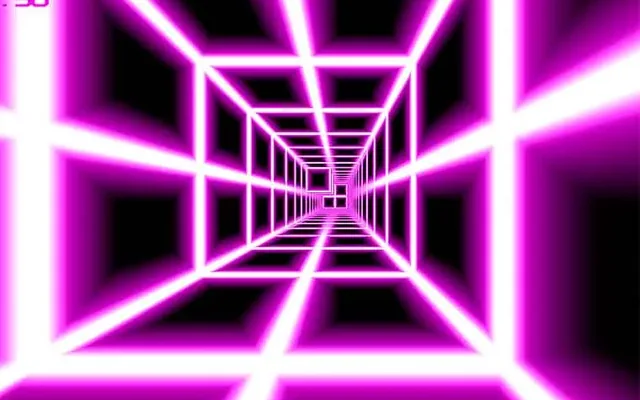
A tunnel, a wall of blocks, and a speedometer that refuses to slow down.
Death Run 3D throws you into a first-person dash down a seemingly endless tunnel packed with colored blocks, walls and narrow gaps. There is no car and no character on screen, just your viewpoint racing forward faster and faster while obstacles rush out of the distance. The only question on every frame is where the opening is and whether you can slide into it before impact.
Its minimalist look is part of the appeal. With simple geometry and bright colors, the game reads clearly even at extreme speed, and it runs smoothly on modest hardware. Levels ramp from forgiving to punishing, and the fast, one-hit-and-restart structure makes it a classic pick for anyone who loves reflex tests that are easy to understand but hard to beat.
You travel automatically through a 3D tunnel, and your job is to steer around every obstacle in your path. Blocks, bars and walls appear in patterns that leave only certain spaces open, so you have to shift your position quickly to line up with the gaps. Touching anything ends the attempt. Each level increases the speed and tightens the patterns, and surviving long enough clears the stage and moves you to the next. Stay calm, make small movements rather than big swings, and keep your focus on the next opening instead of the obstacle directly in front of you.
| Arrow KeysorWASD | Steer through the tunnel |
| Mouse | Alternative steering in supported versions |
| SpacebarorClick | Start a run or restart after a crash |
| PorEsc | Pause the game |
The speed keeps climbing while the gaps shrink, so reaction time gets tighter with every level. Because a single touch ends the run, there is no room for sloppy steering. Most players improve by learning to make tiny corrections and by recognizing recurring obstacle patterns rather than reacting to each block from scratch.
There is no slow-motion option, since pace is the core challenge. What helps is resetting your focus: look deeper into the tunnel, center yourself between obstacles, and avoid large sweeping movements. Once your eyes are trained to read the patterns early, the game feels noticeably slower even though it isn't.
Yes. The graphics are deliberately simple, so it performs well even on basic Chromebooks. Open it on Classroom 6X in any modern browser and it starts right away with no plugins or downloads. Closing other tabs can help keep the frame rate steady during the fastest levels.
Hand-picked from the same categories.